

Nvidia’s H200 GPU which is made on Hopper architecture was released on 13th November, 2023. Since then it has been one of the most efficient and most preferred data center GPU for AI training. Businesses can buy this GPU upfront or rent it from Infrastructure and cloud providers either on bare metal basis or rent it on cloud on hourly, monthly, quarterly (on-demand) on pay-as-you-go basis. Today we will talk in detail about the pricing for the later choice. The on-demand GPU cloud where you only pay for what you use.
As I mentioned GPU cloud can be either taken on hourly basis or monthly, quarterly, half-yearly, yearly basis, however the business needs. The hourly rate is the least useful number on an H200 pricing page. Two providers can both say $4 an hour and still hand you very different bills, because that rate only covers the GPU. There are a lot of things around it where the bill can make a huge difference.
So here is what the rate usually covers, what it leaves out, and what to ask before you commit.
What does the Nvidia H200 GPU price actually cover?
Usually GPU time plus a slice of CPU and RAM, and not much else. The Nvidia H200 GPU price on specialist clouds mostly sits around $3.50 to $5 per GPU-hour in 2026. Hyperscalers like AWS, Azure, GCP are usually above that, often $10 or more per GPU once you divide an 8-GPU node. And many of them only sell the full 8-GPU node.
Anything the hourly rate does not include gets billed on top:
-
Persistent storage
-
Network and bandwidth
-
Faster or human support
-
Minimum rental time or minimum GPU count
How is storage billed on top of the GPU rate?
Separately, and monthly. Persistent storage typically costs $0.08 to $0.15 per GB per month. This might look like a very small number individually, but the storage requirement on a real project is not 1 or 2 GBs, it’s hundreds of GBs and TBs.
A 70B model in FP16 weighs about 140GB. Keep a few fine-tuning checkpoints plus your dataset and you are easily at 2TB. That is roughly $160 to $300 a month. And by the way, persistent volumes usually keep billing even when the GPU is switched off.
Some platforms bundle a base volume into the rate. Others quote the GPU plus a fixed 100GB and charge for everything beyond it. Always check which one you are looking at.
What about network and bandwidth charges?
This is the line that varies most between providers. Hyperscalers commonly charge $0.08 to $0.12 per GB for data leaving their network. Some dedicated GPU clouds state in writing that they charge nothing for ingress or egress. Others bill bandwidth separately, and a few add small fees for public IPs.
When does egress actually start to hurt?
When you move a lot of data around. Pulling one 140GB model out costs somewhere around $11 to $17 at hyperscaler rates, which is nothing. Shuffling multi-terabyte datasets between clouds, or serving large files to users, is a different story. If your workload is mostly prompts in and text out, egress barely matters. If it is data-heavy, it can rival the GPU bill.
If you plan multi-node training, also ask whether high-speed interconnect is included in the price, since it is not always spelled out.
What does “support” mean inside a GPU price?
Usually the bare minimum. Most providers include ticket or email support in the rate. Faster response times, round-the-clock human help and named engineers tend to sit in separate paid plans, especially on hyperscalers.
For a GPU that is running your production inference, three things matter more than the word “support” on a pricing page:
-
A written response time, not “as soon as possible”
-
Whether a real engineer answers or a first-line script
-
An uptime commitment, and what credit you actually get if they miss it
What does a real H200 rental invoice look like?
It splits one hourly rate into separate lines.
Here is an illustrative month, one H200 for 200 hours:
-
GPU time: 200 hrs at $4.00 = $800
-
Storage: 2TB at $0.10/GB = $200
-
Egress: 500GB at $0.09/GB = $45
-
Support: basic tier, $0
Total: about $1,045.
The GPU only cost is roughly 3/4th of the total bill.
What should you ask before comparing two H200 quotes?
Here is the exact list of questions to keep handy while you are planning to rent an H200 GPU. Run every quote through the same short checklist.
|
Item |
What to ask |
Why it matters |
|
Storage |
Is a base volume included, and what is the rate beyond it? |
Checkpoints and datasets add up fast |
|
Egress |
Is outbound data free, capped or billed per GB? |
Decides whether data-heavy work stays affordable |
|
Minimums |
Is there a minimum GPU count or rental time? |
An 8-GPU minimum changes the whole budget |
|
Billing increments |
Per second, per minute or per hour? |
Short jobs get rounded up |
|
Support |
What is the written response time? |
You will need it at the worst moment |
Example of how bundled price looks like:
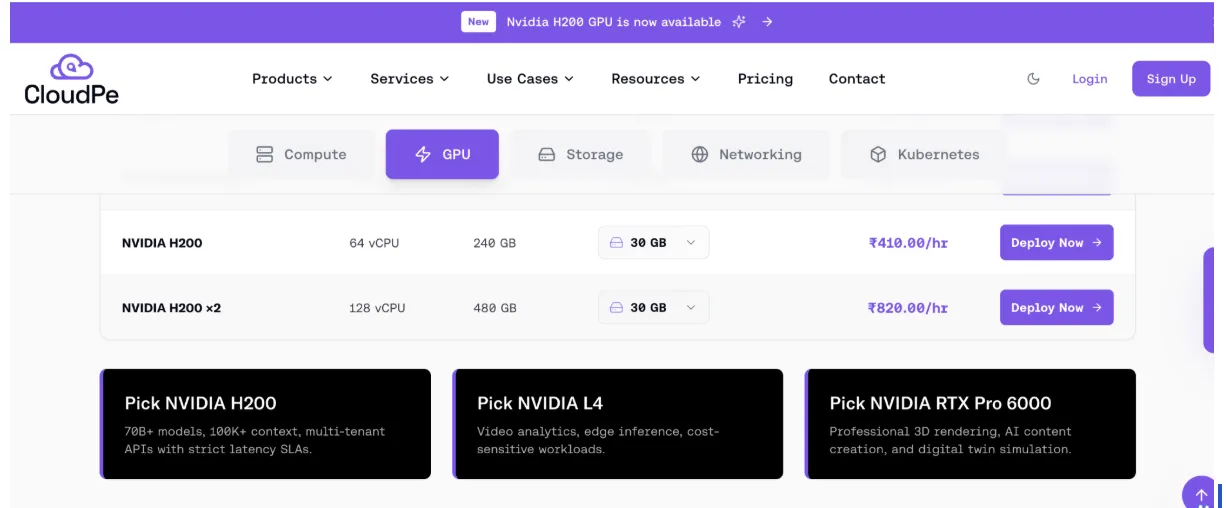
Image is interlinked to pricing page
1x H200
Price: ₹410/hr
Compute: 64 vCPUs, 240GB RAM
Storage: 30GB NVMe
Other benefits:
-
No forex billing
-
No minimum GPU count
-
No egress
Conclusion
Treat the hourly H200 rate as the starting point of the quote. Add up storage, bandwidth and support for your real workload, check the minimums, and then compare. The provider that looks cheapest on the pricing page is often not the one that sends the smallest invoice.
Frequently asked question
Is the cheapest hourly rate usually the cheapest overall?
Not reliably. A low rate with separate storage, bandwidth and support charges can cost more than a higher all-in rate. Compare the total for your actual workload, not the headline number.
How can I keep storage costs down?
Delete old checkpoints you will never reload, and keep large datasets in object storage, which is often cheaper than persistent disk. Only keep on the GPU’s volume what you are actively using.
Do I still pay for storage when the GPU is stopped?
Usually yes. The GPU stops billing when you shut the instance down, but the persistent volume holding your models and datasets keeps running its meter. If a project is paused for weeks, snapshot what matters to cheaper storage and delete the rest.